Hello friends, we’ve been talking about the DCO for some time now, and I wanted to give you a heads up on the project’s current status.
📝 tldr; the DCO validation check has been enabled for all OpenVoxProject repositories, but is not yet required for merging.
Background
So if you’ve not been following along, this may come out of left field for you. Let’s do a quick recap.
There are two competing methods for ensuring that contributors to our projects have the legal right to make contributions and that, in turn, we have the right to distribute those contributions. Many of you might already be familiar with the Contributor License Agreement (CLA) since that’s what Puppet(Labs) used for many years. It basically requires the contributor to irrevocably grant certain rights to the owner of the project; usually things like rights of usage, of distribution, of relicensing, etc. They’re non-standard and a fairly hefty legal document that often needs legal review before agreement. Many people dislike them because they can allow the project owner the legal right to do some pretty heinous things – depending on how the agreement is written, of course.
The Developer Certificate of Origin (DCO), on the other hand, is standard, simple, and legally lightweight.
It just asks the contributor to certify that they own the contribution and have the legal right to contribute it under the project’s chosen license(s).
Generally as long as the contributor understands the open source policies of the their employer, there’s not much legal review required for the DCO.
It does require just a bit of work – each commit must include the Signed-off-by: assertion trailer in footer.
Where we are today
There are indeed benefits to each approach and some people believe that a CLA implies long-term stability. We value personal agency and ownership though, and as such we’re adopting the DCO.
As of today, the DCO validation check has been enabled for all OpenVoxProject repositories, but is not yet required for merging.
We have also configured GitHub’s web editor to sign off commits for you.
This means that you will start seeing failed checks like the following until you start signing off on your commits.
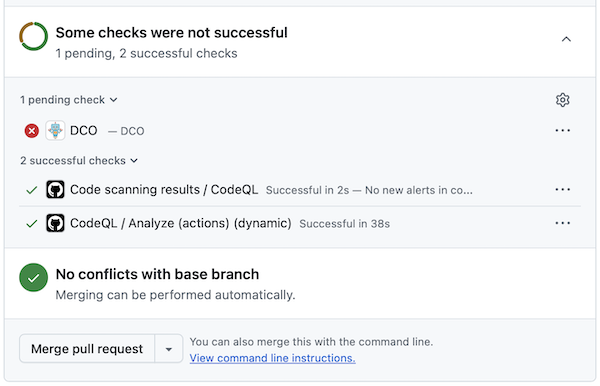
If you click through to see the details of the failure, it will explain how to fix those commits and how to sign off on future commits. You don’t necessarily have to resolve that to merge yet, but within a few months it will become required, so it would be good habit to get into the practice now.
How to use the DCO
You should sign off each commit you make.
On the command line that means git commit --signoff for each and every commit (-s is the short syntax).
Unlike gpg signing, there is no configuration option to do this automatically, and there likely never will be.
This is because the intent is for a human to actively make this assertion with each commit they author.
That said, you can always create a git alias or a prepare-commit-msg git hook if you would like.
The GitHub web interface will do this automatically for each commit you author with the web editor.
If you forget and need to retroactively sign off commit(s) then:
- Last commit:
git commit --amend --no-edit --signoff - Last $N commits:
git rebase --signoff HEAD~N
What about GPG signing?
GPG signing of commits is intended for a different purpose. It is verification that you are the person who authored the commit rather than someone impersonating you. As such, we require both GPG commit signing and DCO signed off commits.
Roadmap
Over the coming weeks and months, you’ll see this propagate to all voxpupuli repositories and you’ll see it becoming a required check.